Yoco vs iKhokha Fees 2026: Which Is Cheaper?
Yoco and iKhokha card fees compared rand for rand in 2026, machines from R599, and what each one really costs you when load-shedding hits mid-service.
Commerce & tax, Accra, Ghana
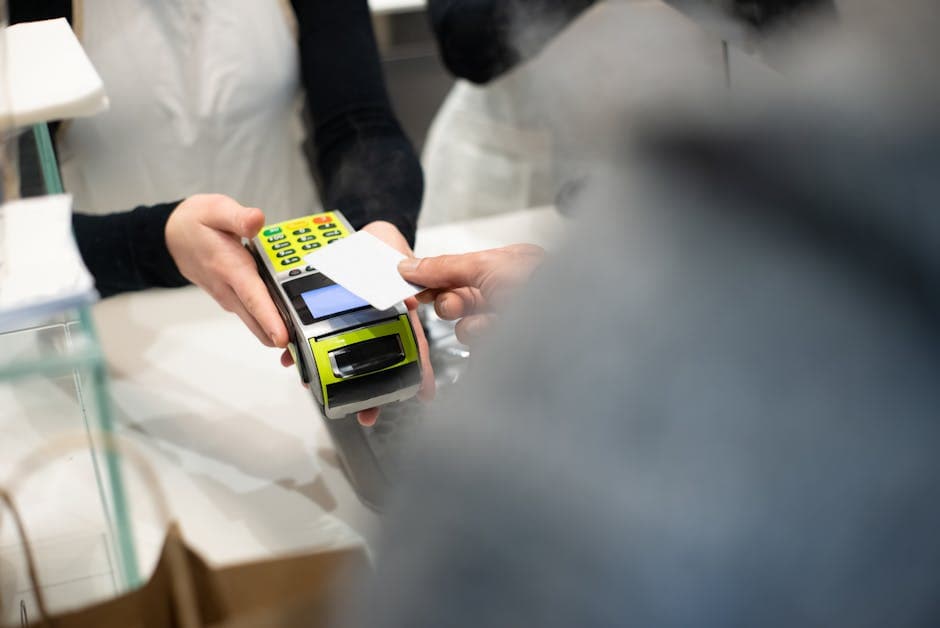
Yoco, iKhokha, and digabloPos: what each one is
Walk into a small shop almost anywhere in South Africa and you will spot a blue Yoco machine or a red iKhokha one next to the till. Both companies earned that spot. They took card acceptance, something the banks reserved for businesses with paperwork and turnover history, and handed it to the hair salon, the coffee trailer and the spaza shop. You buy the machine once, you pay a percentage on each card sale, and you are trading.
The numbers behind the model are simple. iKhokha charges from around 2.75% per card transaction. Yoco charges around 2.95%, plus a R2.50 device fee on every day you trade. Hardware is a one-off purchase for both, from an entry-level reader at R599 up to the R2,999 Yoco Counter for a full countertop setup. The POS software bundled with the machine is free, and that is not generosity: the machine is the product, and the software exists to keep card transactions flowing through it.
digabloPos arrives at the till from the opposite direction. It is a free point of sale app first, not a card machine. It runs on the Android phone or tablet you already own and covers the whole business: sales, stock, staff PINs, end-of-day reports. Card payments go through its native Stripe Connect integration (Visa, Mastercard, Amex, Apple Pay, Google Pay) at Stripe’s published rates, with no markup from digabloPos. Cash, EFT, instant payments and SnapScan are each recorded as separate payment methods, so the evening cash-up reconciles cleanly. There is no monthly fee and no device to buy.
So the honest framing of this comparison is this: Yoco and iKhokha are card terminals with free software. digabloPos is free software that also accepts cards, on hardware you already have. They overlap at the moment the card taps the reader, but they were built to solve different problems, and that difference runs through everything below.
How each one accepts payments
Start with the terminals, because taking cards is what they do best. On Yoco and iKhokha, tap, chip and swipe all run through the dedicated reader, the money settles into your bank account on the provider’s payout schedule, and the percentage comes off each transaction on the way through. The devices are purpose-built for retail: pocket-sized or countertop, battery-powered, connected over mobile data or WiFi. If most of your turnover arrives by card, as it does in a Sea Point coffee shop or a Sandton salon, a dedicated terminal is a comfortable, proven way to take that money. Both companies have also grown past the reader itself, with payment links, online checkout tools and business funding offers advanced against your card turnover.
digabloPos takes cards with no terminal at all. Card payments run through Stripe Connect, which covers Visa, Mastercard, Amex, Apple Pay and Google Pay, and Tap to Pay turns a supported Android phone into the reader. Your customer taps their card or phone against yours and the payment is done. Stripe carries the PCI-DSS compliance burden, and the fees are Stripe’s published rates with nothing added on top by digabloPos. (Stripe availability and payout timing depend on your country; South Africa is supported.)
Then there is everything that is not a card, which in South Africa is a lot. Cash first, still the backbone of township trade. EFT for regulars and bigger orders. Instant payments made from a banking app. SnapScan QR codes in the cities. A card machine has nothing useful to say about any of these. digabloPos records each one as its own payment method against the sale, so when you cash up you can see what should be in the drawer, what landed in the bank and what came through SnapScan, line by line. Recording a cash sale is not hard. Getting a daily report that includes every kind of payment, that is the part a card terminal alone will never give you.
The real cost over a year
A percentage sounds painless until you stretch it across a year of trading, so it is worth laying the costs side by side, item by item:
- Hardware: Yoco and iKhokha need a once-off reader, between R599 and R2,999 depending on the model. digabloPos needs R0, because it runs on the phone already in your pocket. If you want printed slips, a Bluetooth receipt printer costs around R500, and it is optional. - Software: all three are free. But Yoco adds a R2.50 per day device fee on the days you trade, which comes to roughly R900 a year for a shop that opens most days. - Card fees: nobody escapes these. Yoco and iKhokha charge their per-transaction rates, digabloPos passes through Stripe’s published rates. On card processing, none of the three is free, and any comparison that pretends otherwise is trying to sell you something. - Cash, EFT and instant payments: with digabloPos these cost nothing, because there is nothing to process. You record the sale, the report updates, done.
That last line is the one that should drive your decision, because it depends entirely on what your customers actually hand you. In a spaza shop in Khayelitsha or a takeaway in Tembisa, most of the day’s takings are still cash, with the odd EFT. Paying for a reader, plus a daily device fee, plus a percentage on the few card sales you do make, buys you very little there. The till you actually need is the one that tracks stock and counts the drawer honestly, and that till can be free.
Flip the picture for a boutique in Rosebank or a restaurant on Florida Road in Durban, where nine sales out of ten are card. There the terminal fees are simply a cost of doing business, and the machine earns its keep every day.
Most South African small businesses sit somewhere between those two, which is why it pays to do the maths on your own split of cash and card before signing up for anything. And remember that hardware ages, gets dropped and gets stolen. A reader you replace is a new cost. An app you reinstall on your next phone is not.
Loadshedding and offline
No comparison written for South Africa can skip this section, because Eskom will stress-test whatever you buy.
To their credit, Yoco and iKhokha built for it. Their terminals run on batteries and connect over mobile data, so a Stage 4 evening does not switch the machine off. As long as the nearest tower still has power or battery, cards keep working, and for many shops that covers the ordinary two-hour blocks without drama.
digabloPos approaches the problem from a different angle: it does not need the network to make a sale in the first place. The app works fully offline on your phone or tablet battery. Sales keep ringing up, stock keeps deducting, receipts keep printing on a battery-powered Bluetooth printer, staff PINs keep working. When power and signal return, everything syncs on its own. Nothing to re-enter, nothing lost.
Where the two philosophies really part ways is the long outage. Mobile towers carry backup batteries, but through extended or back-to-back load-shedding those batteries run flat and the signal drops with them. At that point a card terminal has nothing left to connect to and becomes a paperweight until the network recovers. An offline till does not even notice. It keeps recording cash sales in the dark, and for a shop that does most of its trade in cash anyway, that is the whole game: the fridge is warming up, the lights are off, but the till still knows exactly what you sold, to the rand.
Two practical habits help either way: keep a charged power bank behind the counter for the phone, and if you print slips, choose a printer with its own battery rather than one that needs mains power.
Which should you choose?
Here is the honest verdict, and it is less of a knockout than the title promises: these products solve different problems, and for plenty of shops they are complements rather than rivals.
Choose Yoco or iKhokha if card payments are the heart of your business and you want a dedicated, purpose-built terminal for them. The hardware is solid, the brand reassures customers at the till, and their funding offers can be useful when you need working capital advanced against your card turnover.
Choose digabloPos if the thing you are missing is the till itself. You get a free, full point of sale: sales, stock control, staff PINs, daily reports, on the phone you already own. It accepts cards through Stripe with no device to buy and no monthly or daily software fee, and it records cash, EFT, instant payments and SnapScan cleanly, so the evening numbers add up.
And a lot of shops quite sensibly run both. digabloPos is the point of sale and the stock manager; the Yoco or iKhokha machine handles tap payments; each card sale gets recorded in digabloPos under the card method, so the daily report stays complete, terminal included. Nothing about the two products fights. One takes the card, the other runs the shop.
The cheapest way to decide is also the most obvious one: start with the free part. Install digabloPos, trade with it for a few weeks, and let your own numbers tell you whether your card volume justifies buying a terminal at all.
The mistakes shop owners make when choosing
A few patterns come up again and again when small businesses pick their payment setup, and most of them are avoidable.
The first is comparing headline percentages and nothing else. A rate of 2.75% against 2.95% looks like a clear win until you add the fixed costs around it: the price of the reader, a daily device fee, the replacement cost when the machine gets dropped or stolen. Fixed costs hit small shops hardest, because they do not shrink on a quiet day.
The second is buying for the shop you wish you had instead of the shop you have. If eighty percent of your takings are cash, a card terminal is a nice-to-have, not a foundation. The foundation is knowing your stock and your drawer.
The third is choosing anything that dies without the internet. Ask the vendor one blunt question before you sign: if the network is down for a full day, what do I lose? With digabloPos the answer is nothing. If the answer you get is vague, believe the vagueness.
The fourth is letting the terminal become the accounting system. Card machines only see card. The cash, the EFTs and the SnapScan payments live in your head or in a notebook, and at month-end nobody can say what the business actually turned over. A till that records every payment type fixes this in one move.
The last one is ignoring stock entirely. No card machine will tell you that cooldrinks are about to run out on a Friday afternoon or that the margin on airtime is quietly slipping. Stock is where small retail makes and loses its money, and it is exactly the part the free bundled card software does not touch.
How to get started this week
You do not need a project plan, a consultant or a Monday morning meeting. Here is a sequence that works.
Day one, install digabloPos on your Android phone and load your twenty best sellers with their prices. That takes one evening in front of the TV. Day two, start ringing up every sale, and keep your notebook going in parallel if that reassures you. By the weekend, run your first end-of-day report and count the drawer against it. That first clean cash-up is usually the moment the notebook retires.
If you want to take cards, connect Stripe from the settings, then either use Tap to Pay on a supported phone or share a payment link. If you already own a Yoco or iKhokha machine, keep using it: just record each card sale in digabloPos under the card method, and your daily report will cover everything, terminal included.
From there, add the rest at your own pace. Full stock counts, staff PINs with separate permissions, a Bluetooth printer for slips, low-stock alerts before the weekend rush. None of it costs a subscription, none of it requires new hardware, and all of it survives load-shedding.
The whole experiment costs R0 and one evening. Compare that with the R599 to R2,999 a reader costs before it has taken a single rand, and starting with the software side is simply the cheaper way to find out what your shop actually needs.
Frequently asked questions
What is a free alternative to Yoco and iKhokha in South Africa?
digabloPos is a free POS that runs on your own Android phone, no device to buy and no monthly or daily software fee. It accepts cards via Stripe Connect and records cash, EFT, and instant payments, all in rand.
Yoco vs iKhokha, what is the difference?
Both are South African card-machine providers with free POS software and per-transaction fees (iKhokha from around 2.75%, Yoco around 2.95% plus a R2.50 daily device fee). iKhokha's rate decreases with turnover; the right one depends on your card volume.
Do I still need a card machine with digabloPos?
Not necessarily. digabloPos accepts cards via Stripe Connect and records cash, EFT, and instant payments, so a cash- or EFT-heavy shop may not need a separate card machine, though you can run a card reader alongside if you take a lot of card.
How much does iKhokha charge per transaction?
iKhokha card fees start around 2.75% per tap or swipe and come down as your monthly turnover grows, with no daily device fee. On a R100 card sale that is about R2.75. digabloPos takes no software cut on top, so the card fee is the whole cost of the sale.
How much does Yoco charge per transaction?
Yoco sits around 2.95% per card sale, plus about R2.50 a day on some readers whether you sell or not. On a R100 sale that is roughly R2.95, and the daily fee adds up on quiet days. With digabloPos the till stays free, so you only carry the card cost itself.
Also on digabloPos
Sources and references
Try the free POS for South Africa
No monthly fee, no device to buy, and it keeps selling through load-shedding. digabloPos runs on any Android, takes cards via Stripe and records cash, EFT and SnapScan. Set up in 5 minutes.
Try for free