Restaurant QR Code Menu and Ordering 2026: Complete Guide and Solutions
Restaurant QR code menu in 2026: how table ordering works, what it changes on the floor, what it really costs, and the places where a QR code solves nothing.
POS & restaurant consultant, 12 years in the industry
Why QR ordering is becoming the standard in 2026
Friday night, the terrace is full. Table 12 finished their first round ten minutes ago and has been trying to catch a waiter’s eye ever since. He is stuck at the far end of the room, rewriting an order somebody scribbled badly. Table 12 gives up and drinks water instead. That scene repeats every weekend, it costs you money every time, and it is exactly the one a restaurant QR code menu removes. The customer no longer waits for anyone in order to spend.
By 2026 the QR menu has stopped being an experiment. The reflex is there: people scan, the menu opens, they look at the photos before they choose. What changed since the pandemic years is the quality of what sits behind the code. The first generation pointed at a PDF that had to be pinched and dragged around a phone screen. A current system opens a page built for a phone, with photos, categories, a basket and an order sent in two taps, on a page light enough to load on a shaky mobile connection without burning half a data bundle.
The staffing situation pushes in the same direction. Hiring and keeping good floor staff is hard in Lagos, in Accra and in Nairobi as much as anywhere else, and the good ones leave for the hotel down the road. When the ordering step moves onto the customer’s phone, the team you actually have absorbs the rush without sprinting from table to table. The QR does not replace the waiter. It takes the most mechanical part of the job off him and leaves him the service, the recommendations and the money.
Then there is what it does to the bill. A customer who does not have to flag anybody down to add a dessert or another bottle orders more readily. The second round goes in because it is a thumb away, not because a waiter happened to walk past at the right moment.
Standard does not mean universal, and we will come back to this further down. There are places where the QR code adds nothing at all, and it is better to know that before you print the stickers.
How it works: scan, order, pay (the customer journey)
The whole journey is three gestures, and nothing has to be installed.
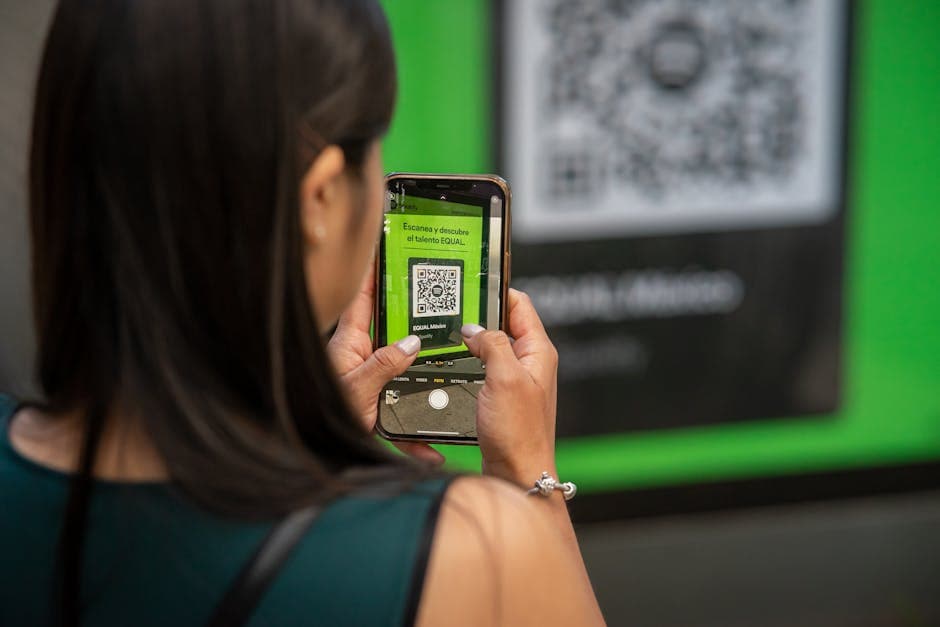
The customer sits down and scans the QR code on the table with the phone camera. No app to download: the menu opens in the browser. Each table has its own code, so the system knows where the order came from without anybody having to say so.
Then they go through the menu. Photos, descriptions, prices, allergens, sorted into categories. They build a basket, adjust their choices (no onion, well done, sauce on the side), add a note if they need to. The total updates as they go, which kills the nasty surprise at the end. That detail matters more than it looks: a customer who watches the total climb in real time orders with confidence, because he is the one deciding when to stop.
Then they send the order, and this is where systems part ways. With digabloPos the order lands straight in the till with its table number. The table bill builds itself, the kitchen sees what it has to cook, and the waiter carries plates without having written anything down. The customer settles the way he would have settled anyway, in cash, by card or by mobile money, when he is ready to leave. Other systems make the customer pay online the moment the order is sent. That makes sense for a food truck. It makes much less sense for a dinner where the table will order three more times before asking for the bill, and it makes very little sense where most of your customers pay cash.
What disappears in this journey is the dead time: the wait to order, the round trip of a waiter who takes the order on a pad and then re-enters it into the till, and the errors that creep in between the floor and the kitchen. An order written by the customer arrives exactly as written. Nobody deciphers handwriting. Nobody forgets the extra cheese.
Concrete benefits for restaurant owners
Let us talk about money, because that is what this is about.
The first gain shows up in the first service: your waiters’ time changes nature. Taking orders, re-entering them at the till, walking back to a table because one dish is missing, all of that goes. The same team handles a busier night, or a smaller team handles the same night. When finding a reliable extra hand for Saturday is a matter of luck, that argument alone usually decides it.
The second gain is turnover. The time between a customer sitting down and his order reaching the kitchen no longer depends on whether a waiter is free. It depends on how long the customer takes to choose. Across a full service, tables free up earlier, and a table that frees up earlier is a table you sell again.
Third: errors. An order entered by the customer reaches the kitchen exactly as he wanted it. The forgotten no onion, the dish put on the wrong table, the cooking instruction misheard over the noise: each of those costs a remade plate, an unhappy customer, often both. They go away with the notepad.
Fourth: the average bill. A menu with photographs sells better than a laminated card, and a customer who can reorder without raising his hand reorders more. The dessert goes in because it appears at the right moment. The second bottle goes in because it takes two taps to ask for it.
Then there is what digital ordering teaches you. Every order leaves a trace: what sells, at what hour, and what never leaves the kitchen. After a month you know which dish earns its place on the menu and which one is squatting there. Those decisions used to be made on gut feeling. They can now be made on numbers, and the first menu you cut on real data is usually the moment the tool pays for itself.
One honest note to close. The QR code will not bring back a customer who was badly received. It removes the waiting, not the relationship. The places that win with QR ordering are the ones that reinvest the time saved into welcome and advice, not the ones that use it as an excuse to strip the human contact out of the room.
Setting up QR ordering with digabloPos: practical steps
If your till already runs on digabloPos, QR ordering is live in half an hour, hardware included. There is no hardware.
Start with the menu. Your products are already in the till, so they are already available for QR ordering. Take the time to add photographs and short descriptions anyway, because this is the menu the customer will read on his phone, and a photographed dish sells better than a line of text. Keep the photos honest: the plate in the picture should be the plate that arrives.
Then create your floor plan. Every table you declare gets its own QR code, and that is what ties an order to the right table. You can group tables by zone (terrace, main room, upstairs) so that service reads naturally on the screen.
Download the QR codes as a PDF and print them. A laminated table stand or a sticker per table is enough. Pick a support that survives spilled drinks and a wet cloth, and skip the loose slip of paper that vanishes with the first table wipe.
For the team, everything arrives where they already work. The order drops into the till with its table number, and the kitchen screen (the Smart Display System) shows it to the brigade. The table bill grows as the customer sends more, and the final payment is taken at the till, as usual.
Before you open it to customers, play the customer yourself. Scan every table, place an order, check it arrives with the right number, have a member of staff cash it out. Then brief the team: what to say to a customer who cannot get it to work, how to spot a QR order on the screen, who answers when a table calls. A team that understands the tool defends it. A team that has it imposed on them will kill it in three days, politely, by offering to take the order the old way.
QR ordering for different business types
The QR code does not do the same work everywhere. Here is where it earns its keep, and where it does nothing at all.
In a sit-down restaurant it is the textbook case. The customer orders when he is ready, reorders without waiting, and the waiter spends his passes on service and advice. The bigger the room or the longer the terrace, the clearer the gain: the metres the waiter no longer walks turn into tables served.
In a bar or a pub, the QR shines on the busy nights. Nobody catches a waiter’s eye in a packed bar on a match night. From the table, the next round goes in with two taps and the tab grows without friction. This is the kind of place where QR ordering pays for itself fastest, and where customers ask for it themselves.
Cafes and coffee shops use it differently: the order placed from the table, or from the queue, so the cup is ready when the customer reaches the counter. A food truck takes the logic to its end, with a code on the side of the van so people order before they even reach the window. In a hotel, the QR in the room replaces the paper room service card, and the order lands in the till like any other.
And then there are the places where, honestly, the QR code makes no sense. The buka in Lagos where the queue moves fast and you order at the counter in thirty seconds has nothing to gain from slowing that flow down: the counter already is the ordering system, and it works. The chop bar in Accra where the server knows the regulars, calls out what came in fresh this morning and carries the mood of the room would lose something real by pushing all that through a phone. Here the server is the connection, and he is the reason people come back. Same for the mgahawa in Nairobi where half the orders are shouted across to the owner. In those houses a modern till is still worth having, for stock and for the books. QR ordering can wait. Judge a tool by the problem it solves: if your customers are not spending time waiting to order, the QR solves nothing.
The mistakes that make QR ordering fail
QR ordering rarely fails for technical reasons. It fails because of these.
The first, which we just covered: putting a QR code where it solves nothing. If the order happens at the counter in thirty seconds, or if the server is the reason your customers come back, keep what you have. QR codes serve rooms where people wait to order, not counters that already move.
The second: a QR that leads to a PDF. The customer zooms, pinches, gives up and calls the waiter. Now you have the worst of both worlds: the friction of digital and the full workload of traditional service. A menu worth the name is a page built for a phone, with a basket and a send button.
The third: a menu that lies. The dish that ran out at eight but is still on display, the price that was raised last month, the photo that no longer resembles the plate. On a paper card the waiter saves you with a word. On a phone nobody saves you. The advantage of a menu wired into the till is precisely that a stock-out pulls the dish by itself. That still assumes somebody keeps the stock honest.
The fourth: removing people instead of redeploying them. A customer ordering from his phone still needs his plates carried, a drink recommended, someone to ask whether everything is fine. The places that treat the QR as a way of cutting service to the bone watch their regulars drift away. The ones that use it to buy presence in the room keep them.
The fifth: forgetting the customers who will never scan. The dead battery, the empty data bundle, the older customer who would simply rather ask: there will be some at every service. Keep classic order-taking running alongside, and keep a few paper menus in reserve. The QR is one more option, never a toll gate at the door.
To start without risk, keep it small. Equip one zone, the terrace for example, for two weeks. Listen to what the customers and the team say, watch what changes in how fast orders reach the kitchen, then extend. Since turning it on is free with digabloPos, the whole test costs you a few laminated prints.
Frequently asked questions
How does QR ordering work in a restaurant?
The customer scans a QR code on the table with their smartphone. The restaurant menu opens in their browser (no app install needed). They order, pay online (Stripe, Apple Pay), and the order goes straight to the kitchen. No server intervention for taking the order.
Does QR replace the server?
No, it complements. QR frees the server from repetitive order-taking and lets them focus on welcome, advice, drinks. Most restaurants keep traditional service in parallel for customers who prefer it or aren't equipped.
How much does QR ordering cost to set up?
From free (digabloPos QR Orders, included in the free plan) to €100+/month for premium solutions (Sunday). Main technical cost: Stripe commission on payments (1.4% + €0.25 for EU cards). No hardware to buy, the customer uses their own phone.
Does QR work without an installed app?
Yes, that's the whole point. The QR opens a standard URL in the phone's browser. No app to install, no account to create. The customer orders in 30 seconds. That's why adoption exploded since COVID, near-zero friction.
How to handle tips on a QR order?
The QR module proposes a tip step before payment (suggestions at 5/10/15% or a free amount). The tip is included in the Stripe total and routed to the restaurant account, you decide later how to split it between staff (manual or automatic per the software).
Also on digabloPos
Sources and references
Try digabloPos QR ordering for free
Turn on QR code ordering in your restaurant in under 30 minutes: a digital menu on the customer’s phone, orders landing in the till with the table bill, kitchen screen. Free to get started.
Try for free